crosstab
The crosstab function is powerful tool from the Pandas library, for creating cross-tabulation tables from a Dataframe.It
allows you to easily summarize and visualize the relationships between categorical variables revealing patterns and frequencies at a glance. Just like your Excel Pivot table, specify what you want to see in columns,rows and which measure should be displayed with a given aggregation function (ex:sum).
# Python code example: given a Sales data sheet stating the number of sales per quarter
import panda as pd
data={'Product':['Ref1','Ref2','Ref3','Ref4','Ref3','Ref2','Ref2','Ref3'],
'Quarter':['Q1','Q1','Q2','Q1','Q2','Q3','Q2','Q1'],
'Level':[100,200,300,200,500,200,150,225]}
df = pd.DataFrame(data)
# display original data in df
print('Display DataFrame df data')
print(df)

corsstab=pd.crosstab(index=df['Product'],columns=df['Quarter'], values=df['Level'],aggfunc='sum')
# display crosstab result
print('Display DataFrame crosstab data')
print(crosstab)
Output:
Display DataFrame df data

  Product Quarter  Level

0    Ref1      Q1    100

1    Ref2      Q1    200

2    Ref3      Q2    300

3    Ref4      Q1    200

4    Ref3      Q2    500

5    Ref2      Q3    200

6    Ref2      Q2    150

7    Ref3      Q1    225


Display DataFrame crosstab data
Quarter     Q1     Q2     Q3

Product

Ref1     100.0    NaN    NaN

Ref2     200.0  150.0  200.0

Ref3     225.0  800.0    NaN

Ref4     200.0    NaN    NaN
To learn more about this function, please check the official documentation
Here.
melt
The melt in Pandas, is used to transform a structured dataframe by melting it into a long-form format. In short it transposes a set of columns into rows, with a new column holding the variable names and another the column. It helps reducing the number of columns and this data reshaping can simplify the analysis.
# Python code example: given a Sales data sheet stating the number of sales per quarter and region (N,S,W,E)
import panda as pd
data={'Product':['Ref1','Ref2','Ref3','Ref4','Ref3','Ref2','Ref2','Ref3'],
'Q1':[100,200,0,200,0,0,0,225],
'Q2':[0,0,300,0,500,0,150,0],
'Q3':[0,0,0,0,0,200,0,0],
'Region':['S','N','W','S','E','W','N','S']}

df = pd.DataFrame(data)
# display original data in df
print('Display DataFrame df data')
print(df)

melt=df.melt(id_vars=['Product','Region'],value_vars=['Q1','Q2','Q3'])
# display original data in df
print('Display melt data, with quarters displayed in one column')
print(melt)
Output:
Display DataFrame df data
  Product   Q1   Q2   Q3 Region
0    Ref1  100    0    0      S
1    Ref2  200    0    0      N
2    Ref3    0  300    0      W
3    Ref4  200    0    0      S
4    Ref3    0  500    0      E
5    Ref2    0    0  200      W
6    Ref2    0  150    0      S
7    Ref3  225    0    0      S

Display melt data, with quarters displayed in one column
   Product Region variable  value
0     Ref1      S       Q1    100
1     Ref2      N       Q1    200
2     Ref3      W       Q1      0
3     Ref4      S       Q1    200
4     Ref3      E       Q1      0
5     Ref2      W       Q1      0
6     Ref2      S       Q1      0
7     Ref3      S       Q1    225
8     Ref1      S       Q2      0
9     Ref2      N       Q2      0
10    Ref3      W       Q2    300
11    Ref4      S       Q2      0
12    Ref3      E       Q2    500
13    Ref2      W       Q2      0
14    Ref2      S       Q2    150
15    Ref3      S       Q2      0
16    Ref1      S       Q3      0
17    Ref2      N       Q3      0
18    Ref3      W       Q3      0
19    Ref4      S       Q3      0
20    Ref3      E       Q3      0
21    Ref2      W       Q3    200
22    Ref2      S       Q3      0
23    Ref3      S       Q3      0
To learn more about this function, please check the official documentation
Here.
rolling
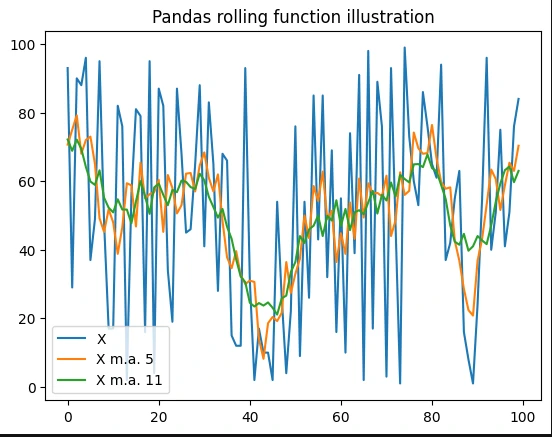
The rolling function in Pandas, is a tool that allows you to perform rolling window calculations on time
series data. It lets you for example apply a statistical function, like mean, to a subset of consecutive observations. The parameter size of the window defines the size of the set of consecutive observations that are used as input for the calculation.
# Python code example: rolling data manipulation with examples
import numpy as np
import pandas as pd
import random
import matplotlib.pyplot as plt
# example data a series of 99 random integers between 1 and 100
df=pd.DataFrame({'x':[ random.randint(1,100) for x in range(100)]})
# overview of the df data
print("df:n")
print(str(df))
# compute a moving average with a window of length 5
df5=df.rolling(5,1,True).mean()
# overview of the df5 data
print("df5:n")
print(str(df5))
# compute a moving average with a window of length 11
df11=df.rolling(11,1,True).mean()
# graph the 3 data series
fig, ax = plt.subplots()
ax.plot(df['x'],label='X')
ax.plot(df5['x'],label='X m.a. 5')
ax.plot(df11['x'],label='X m.a. 11')
plt.legend(loc='lower left')
plt.show()
Output:
df:

     x
0   93
1   29
2   90
3   88
4   96
..  ..
95  75
96  41
97  51
98  76
99  84

df5:

            x
0   70.666667
1   75.000000
2   79.200000
3   68.000000
4   72.000000
..        ...
95  51.600000
96  58.800000
97  65.400000
98  63.000000
99  70.333333
To learn more about this function, please check the official documentation
here.