How to write a p5js script


2024, Jul 03 edited
tags: code p5js javascript 


p5js is an open-source Javascript library derived from the Processing language. The Processing language, promoted by the Processing Foundation, is designed to enable learning to code in a creative way, by making visual and electronic art. While Processing is powered by Java, P5js is its equivalent in Javascript. To be noted that p5js also benefits from the support of the Processing Foundation. To learn more about this language don't hesitate to go to the P5js official website.

This art, like a painting, can be made by displaying drawings, animations or text in a frame, called the Canvas. The Canvas can be static but with the help of some additional code can also be animated. It's possible to apply mouvement or tranformations to the objects drawn on the Canvas.
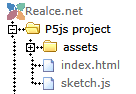

Files for this project


A p5js project being based on Javascript, the p5js projects can be run in the browser. In terms of folder and file organization, projects can be initialized in a dedicated folder and organized as follows: :

P5js project file organization

  • index.htm : an HTML file that will display in browser the result of the animation, it references links to the p5js library files and to the specific js file of the project;
  • sketch.js : it's the heart of the project, a Javascipt file where all the js code of the animation will be entered;
  • assets : an optional folder were additional files can be stored like images, sound files or video files used by the project.

  • This is tipically the type of organization that you'll find in the Coding Train's p5js coding challenges.


    Functions for this project


    A p5js script is written in several parts or functions, like shown below

    
    // P5js script functions
    
    function preload() {
      // preload function used to preload the assets: images,sound,video or font files
      ...
    }
    
    function setup() {
      // setup function aimed to initialize the canvas
      ...
    }
    
    function draw() {
      // draw function aimed to define what happens during each loop of the animation
      ...
    }
    

    Here are the main ones:
    • setup() : a function designed to initialize the characteristics of the initial scene : the Canvas - the frame on which the objects will be drawn -, the visible objects and their starting position. This function runs only once, when the script is launched
    • draw() : the optional function that will be executed on each loop of the animation.It's designed for rendering graphics, handling events and updating the scene.
    • preload() : a function that is run once before the setup function, usually dedicated to preload external assets like images, sounds or font files

    But there are also other functions that allow for example adding some interactivity to the animations:
    • mousePressed() : a function designed to assign action to a mouse click on the Canvas
    • mouseDragged() : a function designed to assign action to a mouse move while mouse button is pressed
    There are many others, the full list is available on the P5js Official website.

    The fuel of coding inspiration:music, travel, photography and whatever drives creativity to code.

    You might also like